


Busch Gardens
4.32.29K Reviews
App Specs
- Version
- 7.1.63.140594
- Updated On
- License
- Free
- Downloads
- 1,000,000+
- Developer
- SeaWorld Parks & Entertainment Inc.
- Categories
- Travel & Local
- Platform
- Android, iOS
Screenshots
 Analysis by AppCompare
I judge a theme park app less by how many icons it can fit on a screen and more by whether it helps me make a better decision while I’m standing in a busy park. The Busch Gardens app is most useful when I treat its map, wait-time information, and park hours as a practical planning kit rather than a promise that every moment will run to schedule. It gives me a way to orient myself, check what is worth doing next, and avoid making every choice from memory.
That focus matters because a park day is full of small decisions: whether to cross the grounds now, pause for a ride, or save energy for later. I wouldn’t expect an app to remove queues or make a packed day effortless. I would expect it to help me spend less time guessing, and that is the job this one is best suited to do.
A park map that supports decisions
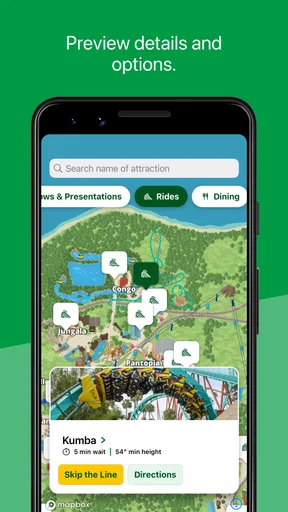
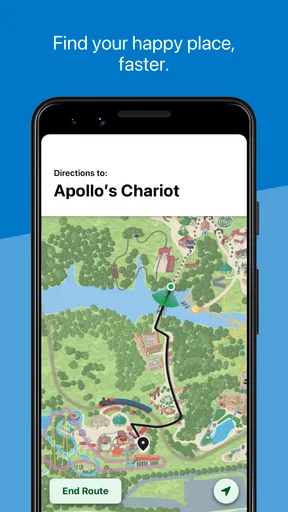
The map is more than a digital replacement for a paper handout when I use it as a reference point throughout the day. I can look at where I am, see the layout around me, and decide whether the next stop makes sense from here. That is especially helpful when the group has different priorities: a coaster fan may be ready to head across the park, while someone else wants a calmer break first.
My practical tip is to check the map before leaving a spot, not only after reaching a junction and feeling uncertain. A quick look can help me choose a direction and avoid unnecessary backtracking. I also use it to make plans with landmarks in mind, which is easier than trying to remember a long sequence of turns while keeping track of other people.
Wait times are guidance, not a guarantee
Wait-time information is valuable because it gives me a reason to compare options instead of walking toward the ride I happen to remember first. If one attraction looks less appealing at the moment, I can consider another nearby choice and check again later. The point is not to build a perfect schedule; it is to keep enough flexibility to adjust when conditions change.
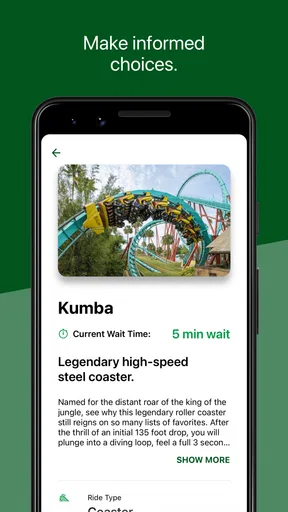
I’d treat a listed wait as a snapshot, not a personal promise about how long I’ll stand in line. A queue can change while I am walking, and the displayed estimate should not replace what I can see on arrival. For a group that would rather avoid a long wait, the app can help start the conversation about switching plans, but it cannot make that decision for everyone.
Hours help set the shape of the visit
Park hours are useful before I set out and again when I’m deciding how to use the remaining part of the day. Checking them early can help me avoid planning an arrival or last ride around an assumption. Once I am there, they give the day a basic frame: I can decide what matters most and leave room for food, rest, and an unhurried walk between areas.
Worth Reading Before You Choose

EA SPORTS FC Mobile 26 Is a Bigger Football Game, but It Takes Time

Flipboard Shows What News Apps Must Do Beyond the Feed

Switching to Android Auto Means Rethinking Your Driving Routine

Google Calendar Makes a Crowded Week Easier to Manage

Ludo King Makes the Most of the Minutes Between Plans

Baby Panda World Brings Quick Play to Modern Phones, but Its Game Library Feels Busy
I would still confirm the app’s current information as part of getting ready, especially if my plans depend on a particular opening or closing time. The app is a convenient place to check, but I wouldn’t build a tightly timed itinerary around one screen without allowing for delays, changing plans, or the simple fact that a group may want a longer break than expected.
Best used as a flexible companion
The app is free, comes from SeaWorld Parks & Entertainment Inc., and sits in the travel and local category. It has a 4.3 average from around 7,200 ratings, and more than a million installs. Its age rating is Everyone. Those figures suggest it has broad appeal, but they don’t tell me whether its approach fits every visitor; the useful test is whether I want a park-specific map and live planning reference in my pocket.
On an ordinary visit, I’d use it in short bursts: check the hours before leaving, open the map when choosing the next area, then compare wait times before committing to a ride. That keeps the phone useful without letting it take over the day. It’s also a sensible approach for families, since one person can check the next step while everyone else stays focused on the visit.
Getting Started with the Busch Gardens App
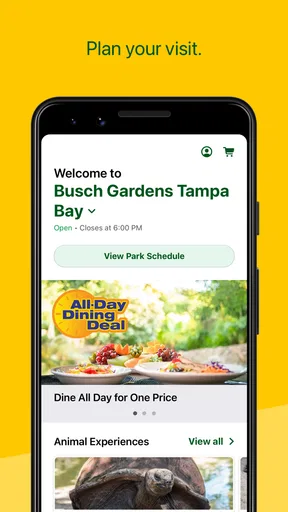
First off, downloading the app was a breeze. It's available for both Android and iOS, so no worries about compatibility. Once you open it, you're greeted with a vibrant interface that just screams fun. It's colorful, intuitive, and sets the mood for an adventurous day ahead.
Navigation and Features
Let's dive into the nitty-gritty of what this app has to offer. The Busch Gardens app is packed with features designed to make your visit as smooth as possible. The map is a lifesaver, especially if you're like me and can get lost in your own neighborhood. It’s interactive, showing not only your current location but also the attractions, dining spots, and restrooms nearby. No more wandering around aimlessly!
Another highlight is the real-time updates. You can check out wait times for rides, which is super handy if you want to maximize your time at the park. Plus, the app sends you notifications about showtimes and special events, so you won't miss a thing.
Planning Your Day
The app also has a nifty feature where you can create a personalized itinerary. You simply add the attractions you want to visit, and it helps you plan your day around them. It's like having a theme park concierge service!
For families, the app offers detailed information about each ride, including height requirements and thrill levels, so you can plan accordingly. And if you’re into animal experiences, the app provides a schedule and map for all the exhibits and shows.
Dining and Shopping
Now, let's talk about food—because who doesn't love theme park snacks? The app gives you a full rundown of all the dining options available, complete with menus and pricing. You can even filter by dietary preferences, which is a thoughtful touch. And if you're looking to grab some souvenirs, the app has you covered with a list of all the shops and their locations.
Exclusive Offers and More
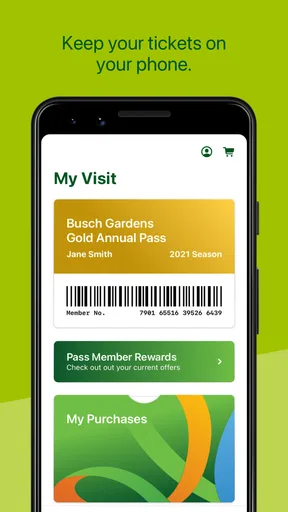
One of my favorite parts of the app is the exclusive offers section. You get access to special deals on tickets and merchandise, which is always a nice perk. Plus, the app integrates with your membership or ticket, so you have everything you need right at your fingertips.
For those who love sharing their experiences, there’s a social feature where you can connect with other park-goers and share your favorite moments. It adds a nice community vibe to the whole experience.
Final Thoughts
In conclusion, if you're heading to Busch Gardens, downloading this app should be at the top of your to-do list. It's like having your own personal tour guide, helping you navigate the park efficiently while ensuring you don’t miss out on any of the fun. From real-time updates to exclusive offers, the Busch Gardens app is a must-have for anyone looking to make the most of their visit.
So, what are you waiting for? Grab your phone, download the app, and get ready for a day full of thrills, laughter, and unforgettable memories!
A realistic way to use it with a group
Picture arriving with friends who have different ideas about the day. Rather than debating the entire itinerary at the entrance, I’d agree on one priority each, check the map, and choose a first area that suits the group. Before walking to the next attraction, I’d compare the displayed waits and ask whether everyone is still happy with the plan. This small rhythm—choose, check, adjust—keeps the app helpful without turning the visit into a race to tick off every ride.
It can also reduce the familiar “where should we meet?” confusion if people split up briefly. I’d pick an obvious point on the map and make that the regrouping spot instead of relying on vague directions. The map is useful for orientation, but a clear meeting plan is still better than expecting a phone screen to coordinate a scattered group.
When a park app beats a general map
A general map app is good for getting to the park and finding nearby places beyond it. Once I’m inside, though, a park-specific map and wait-time view are more relevant to the immediate decisions I’m making. I don’t need to search for the park as if it were an unfamiliar neighborhood; I need to understand what is nearby and whether a ride is worth heading toward now.
That advantage has a boundary. If I’m planning transport, arranging an off-site meal, or comparing other local attractions, a regular map or travel app is the better tool. Busch Gardens is most compelling for the in-park part of the day, not as a replacement for every travel-planning app on my phone.
Keep the phone from becoming the main event
There is a real trade-off in relying on a phone at a theme park: checking information can save a detour, but repeated screen time can interrupt the day and drain attention from the people I came with. I’d decide in advance who is doing the occasional check, then put the phone away between decisions. This is especially useful when visiting with children or anyone who finds it tiring to keep stopping while the group consults a screen.
I’d also avoid treating a planned sequence as a contract. Weather, energy, appetite, and changing interests can all shift what feels like a good next step. The app can help me respond to those changes, but it cannot judge whether the group needs a break. A flexible outline is more useful than a minute-by-minute plan.
Who will get the most from it
I’d recommend it most to first-time visitors, families coordinating different ride preferences, and anyone who dislikes navigating an unfamiliar park without a reference. It is also handy for repeat visitors who know their favorite attractions but want to make a quick choice based on current waits rather than habit. The current version is 7.1.17.117525, and the app has been available since December 16, 2011; its long presence does not change the practical question of whether these park-specific tools match the way you like to plan.
If I were visiting mainly to relax, wander, and decide everything as I go, I might install it but use it sparingly. If I wanted detailed trip planning beyond the park, I’d pair it with a general travel tool. Someone who prefers not to use a smartphone during outings can get by with other directions and a loose plan, though they would give up the convenience of checking waits and the map in one place.
Before setting out, I’d make sure the app is installed and open it while I have a calm moment, rather than waiting until the group is already moving. I’d check the park hours, get familiar with the map, and decide which information I expect to consult during the visit. That quick preparation makes it easier to use the app in short, purposeful checks instead of fumbling with it at every turn.
My final take
I see Busch Gardens as a practical companion rather than a reason to download an app for its own sake. Its most useful role is helping me orient myself and make better next-step choices with the map, wait times, and hours. It is free, so trying it before a visit is an easy call if you expect to use those tools; just keep your plans flexible and remember that the best park day is not necessarily the one with the most screen checks.
Pros
- Immersive virtual theme park experience.
- Stunning graphics and detailed environments.
- Fun mini-games and challenges.
- Regular updates with new content.
- User-friendly navigation and controls.
Cons
- Requires constant internet connection.
- Large storage space needed for installation.
- In-app purchases can be expensive.
- Battery drains quickly during gameplay.
- Limited offline features available.
FAQs for Busch Gardens
What type of experience does the Busch Gardens app offer?
The Busch Gardens app provides an interactive experience designed to enhance your visit to the amusement park. It offers a park map, ride wait times, show schedules, and dining options. Additionally, the app allows you to purchase tickets, plan your itinerary, and receive real-time notifications about park events and promotions.
Is the Busch Gardens app free to download and use?
Yes, the Busch Gardens app is free to download on both Android and iOS devices. However, while the app itself is free, some features may require in-park purchases or additional fees, like buying tickets or special event access. Always check for any in-app purchase options that might be available.
How accurate are the ride wait times on the Busch Gardens app?
The ride wait times on the Busch Gardens app are updated in real-time to provide accuracy, helping you plan your day effectively. However, occasional discrepancies can occur due to sudden changes in park conditions or technical issues. It's always good to verify with on-site park staff if you notice significant differences.
Can I use the Busch Gardens app without an internet connection?
While some features of the Busch Gardens app, like the park map, may work offline, most functionalities require an internet connection. To access real-time information like ride wait times and show schedules, ensure you have a stable internet connection, either through mobile data or the park’s Wi-Fi.
What are the benefits of creating an account on the Busch Gardens app?
Creating an account on the Busch Gardens app allows you to personalize your experience. You can save your favorite rides, shows, and dining options, receive personalized notifications, and streamline ticket purchases. Additionally, an account may help you access exclusive offers and manage your season pass more efficiently.


